A free tool by Inna Ryzhykh
A year of your running on one page
One key in Garmin Connect, one prompt in Claude Code, and twenty minutes later you have a page that answers the main question: is your base in order?
No sign-up · your data stays on your computer
What is inside
Not eight dashboards to choose from, one answer
Garmin shows a hundred numbers and not a single conclusion. This dashboard reads a year of your runs by the same rules I use to read my athletes' training logs.
The verdict
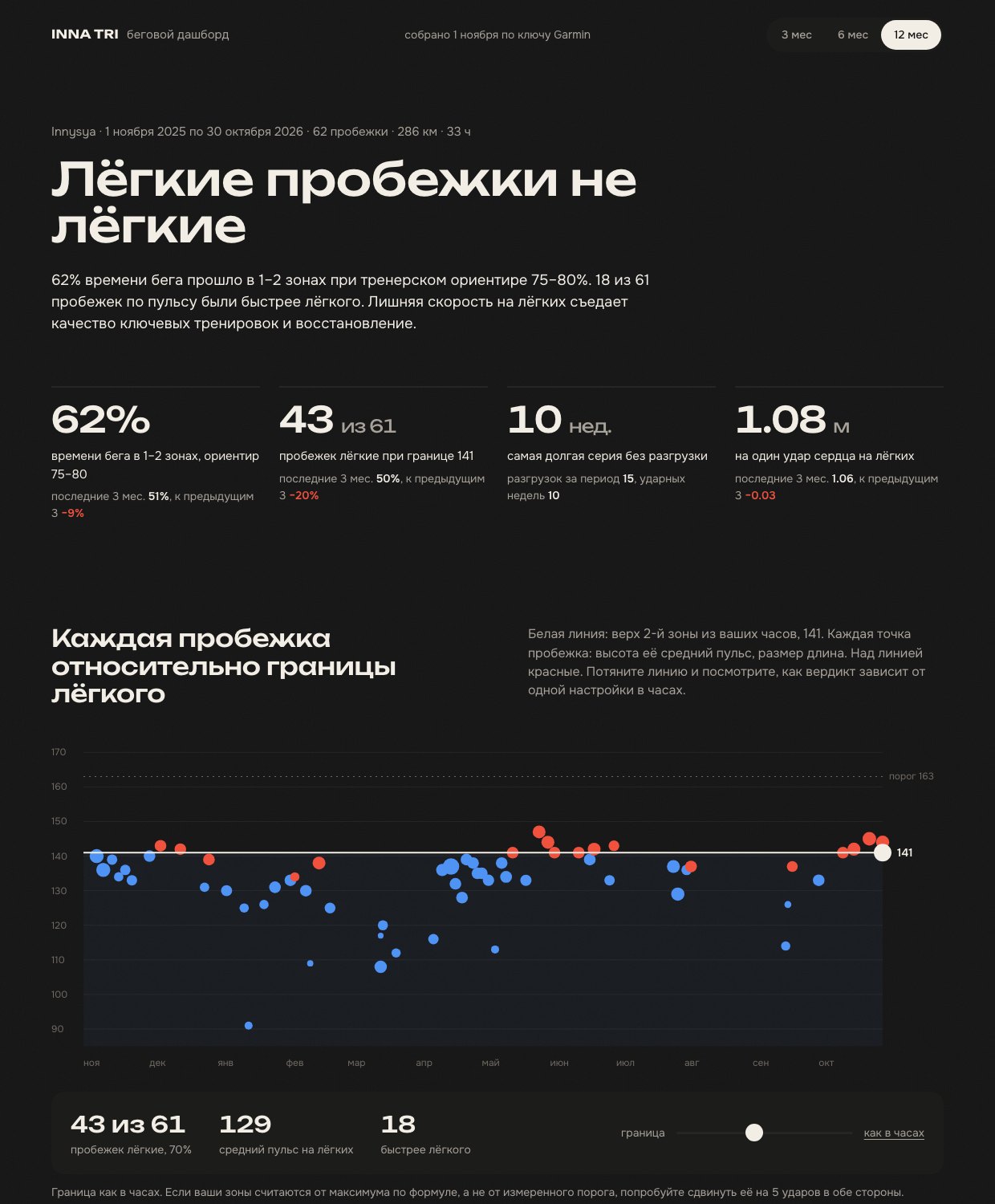
One line at the top: what is wrong with your training first. Easy runs that are not easy, too long without a recovery week, a ragged schedule, or a base in good order. Three numbers next to it prove it.
The easy line
Every run of the year as a dot against the easy heart rate ceiling from your own watch. Drag the line and see how much the verdict depends on one setting in Garmin.
The week tape
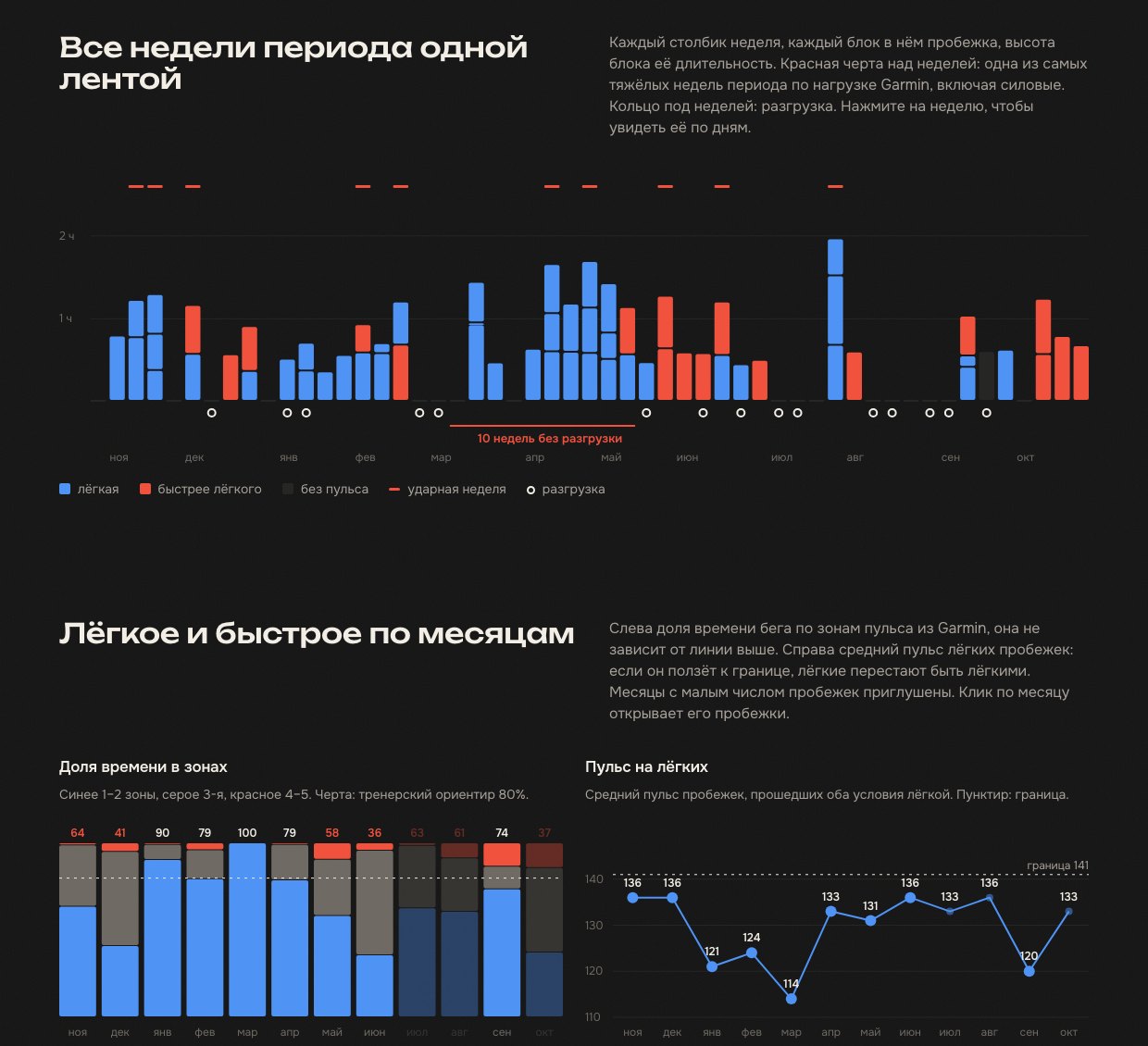
Each week a column, each run a block. Hard weeks, recovery weeks and the longest stretch without one are visible at a glance. Click a week to open it day by day.
Fitness and recovery
Metres per heartbeat: the only measure of form that needs no test. And resting heart rate by week against the hard weeks, to see whether you recover enough.
What you need
- A Garmin watchAny model that records heart rate and syncs with Garmin Connect. The longer the history, the more honest the picture, but three months is already enough. Older watches without zones or Training Load work too: the dashboard fills those in itself.
- A computerMac or Windows. The Garmin key and all your data stay on it; nothing goes to the cloud.
- ClaudeThe Claude desktop app with its Code tab, or Claude Code in the terminal. A Pro or Max subscription is required. Step three shows how to set it up.
- Twenty minutesAbout five of them are yours: create the key and check your zones. Claude Code does the rest on its own.
The guide
Four steps
-
Create a Garmin personal key
Since October 2026 Garmin gives every user a personal key to their own data. This is the official way in: no password is shared, no third-party libraries are needed, and the key can only read.
- Open connect.garmin.com → Settings → Personal API Key and log in if asked.
- Click Create Key, read and accept the terms.
- Choose 1 year as the expiration, otherwise you will repeat all this in a month.
- Copy the key right away. Garmin shows it once. If you lose it, delete the old key on the same page and create a new one.
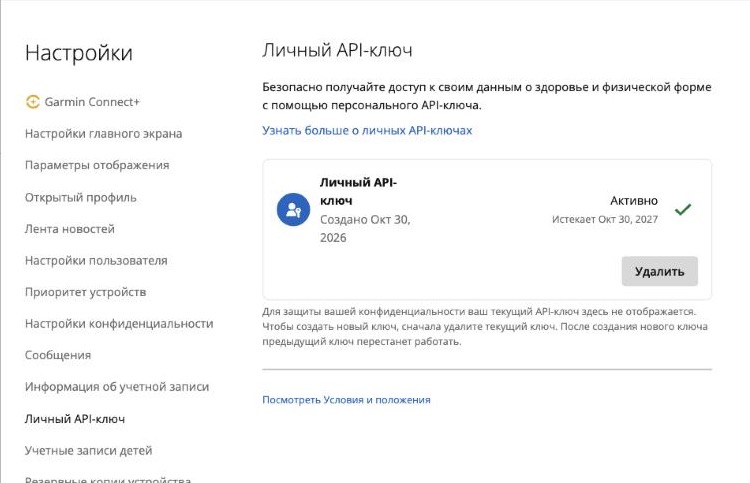
This is how the page looks once the key exists: Garmin shows when it expires and never shows the key itself again. -
Check your heart rate zones in Garmin
The dashboard takes the easy ceiling from your watch, so everything depends on your zone settings. On newer watches zones are set only in the Garmin Connect app on your phone. The path is:
Your watch → Settings → User Profile → Heart Rate and Power Zones → Heart Rate
- At the top there are three numbers: max heart rate, lactate threshold heart rate and resting heart rate. Tap any of them to correct it.
- Open Zones, then Based On. The best option is % of lactate threshold heart rate, if your threshold comes from a test or the watch detected it on a run with a chest strap.
- If your maximum is set by the 220 minus age formula and you have never measured it, your zones are almost certainly off. The dashboard will notice and warn you.
- Separate running zones live under Sport-specific heart rate. If they are set, the watch uses them instead of the general ones.
- Do not change settings at random. You can move the ceiling right on the dashboard and see what changes.
Menu names can differ slightly depending on the app language and version.
-
Install Claude Code
This is an assistant that works right on your computer: it creates folders, downloads files and runs scripts. The regular Claude chat in a browser or on a phone cannot do that, so the dashboard cannot be built from a phone. A Claude Pro or Max subscription is required.
The easiest way is the app. Download Claude for Mac or Windows, sign in and open the Code tab at the top of the window. It is the same Claude Code with a normal window instead of a black screen: pick any folder, paste the prompt into the message box and press Enter. It asks permission before each action; answer yes.
If you prefer the terminal. Open Terminal on Mac or PowerShell on Windows, run the command on the right, then type claude, sign in and paste the prompt. Anthropic has a detailed walkthrough with pictures: code.claude.com/docs.
-
Paste the prompt
Copy the whole text from the block below and paste it into Claude Code. It downloads three files from this site, installs what is needed, asks you to paste the key into a file, pulls your data and opens the dashboard in your browser. The only thing you do by hand is paste the key into the file it opens and save. A week or a month later, tell Claude Code “update the dashboard” and it pulls in the new runs.
The prompt
Paste it into Claude Code as a whole. You do not have to read it, but you can: it contains nothing but the steps and the safety rules.
If something goes wrong, do not edit the prompt. Just tell Claude Code what happened in your own words. It will sort it out or ask you.
Build me the InnaTri running dashboard from my Garmin Connect data. Walk me through it step by step in plain language and do everything technical yourself: folders, files, installs. Stop and wait for me only where I have to act.

Rules
- Never print my Garmin key in the chat, never put it in a command, never write it anywhere except the file garmin.env. When you check it, say only “the key is in place” or “no key”.
- The key and the data stay on my computer. Add the data folder and garmin.env to .gitignore.
- The Garmin key is read-only; it cannot change anything in my account.

Step 1. Folder and files
Create a folder called innatri-dashboard in my home folder and work inside it. Download these three files into it:
- https://innatri.com/guides/dashboard/fetch_garmin.py
- https://innatri.com/guides/dashboard/build_dashboard.py
- https://innatri.com/guides/dashboard/template.html
Check that I have Python 3.10 or newer; if not, help me install it. Create a virtual environment and install the package garmin-connect-personal-api-python into it.

Step 2. The key (I do this part, you guide me)
Create the folder ~/.config/innatri and inside it the file garmin.env with one line:
GARMIN_API_KEY=
Set the file permissions to 600. Open it in my text editor and tell me the full path. I will paste the key right after the = sign with no spaces or quotes and save. If I do not have a key yet, tell me: it is created at https://connect.garmin.com/app/settings/personalApiToken with the Create Key button, 1 year is the best expiration, and it is shown only once. Then check that the value is filled in, without printing it.

Step 3. Data
Run fetch_garmin.py --months 12. If Garmin returns 401, the key was copied incompletely or has expired: ask me to check the file. If it returns 500, the script shrinks the batches on its own, just let it finish. At the end tell me how many activities and days came back.

Step 4. Dashboard
Run build_dashboard.py --lang en. If it warns that the zones in my watch are based on maximum heart rate, pass that warning to me word for word. Open dashboard.html in my browser.

Step 5. Summary
Tell me four things from the dashboard: the verdict, the share of time in zones 1 and 2, how many runs out of how many were easy, and the longest streak of weeks without a recovery week. Do not advise anything beyond that; the coach does the reading.

When I say “update the dashboard”, repeat steps 3 and 4.
No varnish
What this dashboard does not know
Every threshold in it is a coach's threshold, and every one is named. But there are things Garmin data cannot tell. Better to say so up front than to answer it in the comments.
- How your heart rate was measured
Garmin does not say whether it was a chest strap or the optical sensor on the wrist. Optical sensors are off by 5–10 beats on intervals and in the cold. Monthly averages are more reliable than single runs, and a chest strap settles the argument.
- Where your maximum came from
If it is set by a formula, all the zones are shifted with it. The dashboard prints where the ceiling came from and warns you, but it cannot measure your maximum for you.
- Heat, illness, lack of sleep
A long run in the heat drifts upwards in heart rate towards the end, and the average does not forgive it. Resting heart rate after a glass of wine is three beats higher. These are limits of the method, not your mistakes.
- How Garmin computes load
Training Load is a closed Firstbeat model. Here it is used only to compare weeks with each other: to find the hard ones and the recovery ones.
- VO2max, training status, predictions
The Garmin personal key does not provide them. The dashboard is deliberately built on what was measured, not estimated, and draws nothing extra.
- Your life around running
The dashboard sees your runs but not your work, sleep, stress or goals. So its verdict is a reason to talk to a coach, not a diagnosis.
This is a tool for reading training data, not medical advice. Its thresholds are adjustable, its conclusions depend on the zone settings in your watch, and it is best read as a 6–8 week trend rather than week by week. The scripts are open, run only on your computer and send data nowhere. The Garmin key can be revoked at any time on the page where it was created.
Questions
I am not a programmer. Will I manage?
Yes. You do two things by hand: create the key in Garmin and paste it into a file that Claude Code opens for you. It does and explains everything else as it goes. If you get stuck, tell it what you see on the screen in your own words.
Is it safe? Where does my data go?
Nowhere. The scripts download your data from Garmin's servers to your computer and build one HTML file from it. The key sits in a file only you can read; it never enters the chat. Claude Code only sees what the scripts print: activity counts and warnings.
Garmin returned error 401
The key was copied incompletely, with a space, or has expired. Open garmin.env and check the line. If the key was a 30-day one, create a new one on the same Garmin page.
The dashboard says my zones are based on maximum heart rate
That means Garmin computes your zones as a percentage of maximum heart rate. It is not an error, but if the maximum was never measured and comes from a formula, the easy ceiling may be off by 5–10 beats. Drag the line on the dashboard five beats either way and see whether the verdict holds. If it does not, measure your threshold or maximum.
I run a lot on the treadmill
Treadmill heart rate is real, so treadmill runs count in every heart rate metric. Pace without a footpod is unreliable, so they are excluded from “metres per heartbeat”. Treadmill runs are labelled in the tables.
I run without heart rate or with gaps
Runs without heart rate count in kilometres but not in zones, and the dashboard tells you how many there are. If fewer than 60% of runs have heart rate, there is no verdict, only an honest “heart rate not recorded everywhere”. Days without the watch are not counted as zeros.
Can I change the rules for myself?
Yes. The easy ceiling moves right on the page. The recovery week threshold is set with the --deload flag at build time, and the ceiling can be fixed with --easy-ceiling. Every threshold is listed at the bottom of the dashboard under “How it was calculated”.
Why not Strava and why not an app?
Strava does not hand out zones and resting heart rate so simply through an open key, and an app would mean your data lives with me. Here it lives with you.
What to do with these numbers
The dashboard shows facts. What to do next is a coach’s call. If you want the picture to look different six months from now, I coach runners and triathletes online.